Customise AI4Padel: templates, tone and signature
No two clubs write alike. One is on first names and closes with an emoji; another addresses players of twenty years formally. AI4Padel does not ship with a factory voice: it adjusts to your club, and this guide walks through every piece you can touch. And the one piece you can’t. The screenshots show the real product, which today speaks Spanish.
The number is yours
Messages leave from the WhatsApp number of your club, not from a platform: from the one your players already have saved. They leave from there because you send them: you press «Enviar invitación» (send invitation), the club’s WhatsApp opens with the message already written, and you send it. For the player it is a normal conversation with their usual club, no new app, no new account. Even your 68-year-old player replies “yes”, and you seat them in the match with one click.
It also means replies land at the club, not on your personal phone and not in AI4Padel: you read each player’s answer in the club’s WhatsApp and note it on the match, «Sí» (yes), «No puede» (can’t) or «Otra» (other). And the number and the conversations are yours: if you ever leave AI4Padel, you keep them.
Everything comes from your templates
Every message AI4Padel prepares is born from a club template. Not one made-up word ever reaches a player, and none reaches them without you seeing it before you press send.
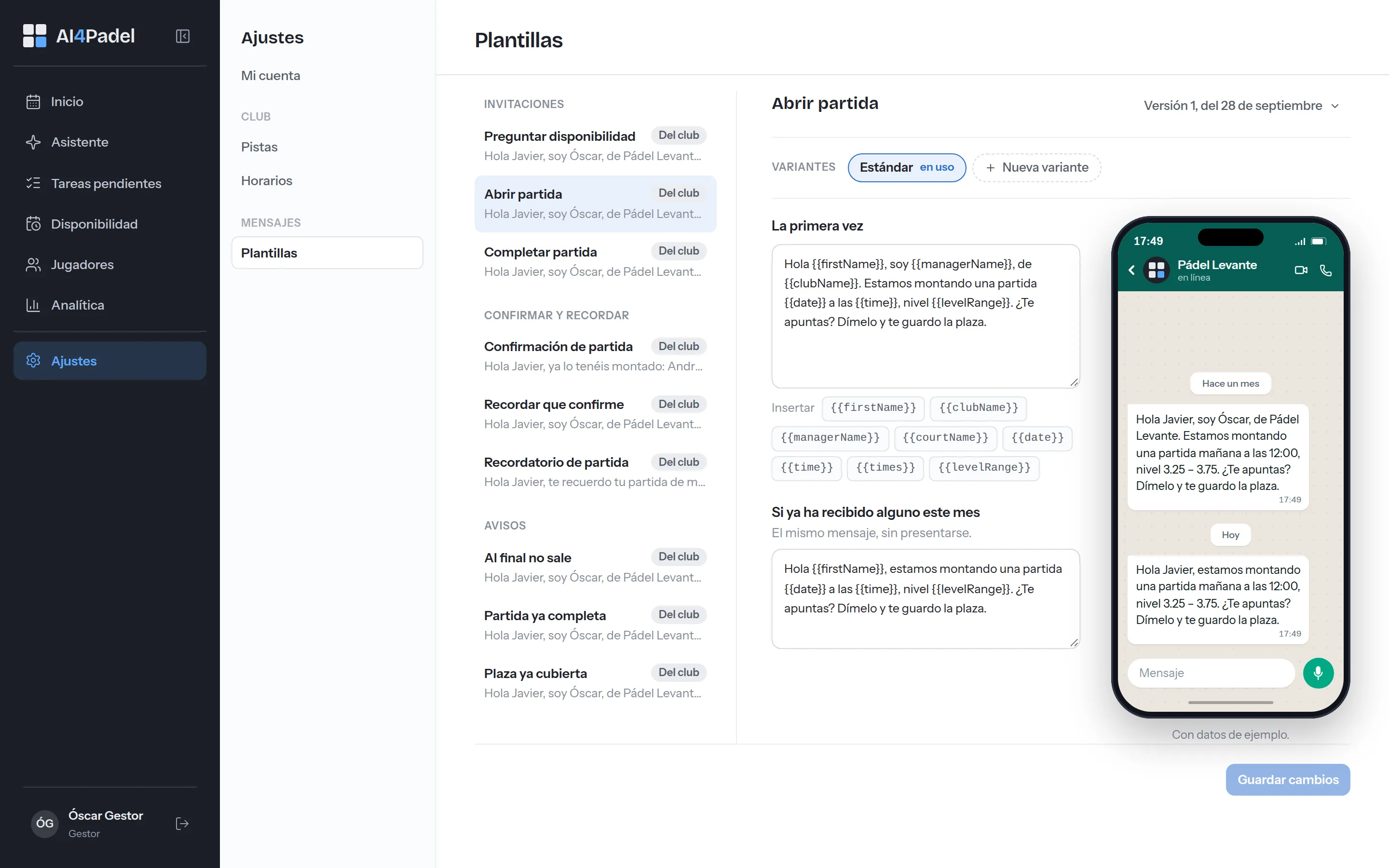
Settings › message templates: every template with its text, its variables and, on the right, how the player will see it on their phone.
There is a template for every moment: invitations («Abrir partida», open a match; «Completar partida», complete a match), confirmations and reminders («Confirmación de partida», «Recordar que confirme», «Recordatorio de partida»), change notices («Se cayó alguien», someone dropped out; «Cambio de hora», time change; «Partida cancelada», match cancelled; «Jugador que dejas fuera», a player you left out) and the closing one, «Partida ya completa», match already full. Each one can have variants, tuned with you during setup until they sound like your club, and carries variables like the player’s name, the date, the time or the match level. Every save creates a new version: if you change the greeting in March, you will always know which text was live in February.
A detail people appreciate: every template has a shorter version for someone who has already heard from you in the last month. Greeting them by name is still nice; introducing yourself again isn’t. And on the right, as you type, the WhatsApp exactly as the player will get it.
When you set up a match you choose which template each moment uses, and if that match calls for it, «Personalizar mensaje» (customise message) lets you change the text for that match alone.
The signature
What other tools call “the club’s voice” is two things here: your templates and your signature. The signature lives in Settings › Asistente, and it’s the line that closes the messages the club prepares. You write it once.
Nothing leaves without your click
Today there’s nothing to configure here: no message goes out on its own. No automatic mode, no scheduled sends, no reminders that fire by themselves. You send every WhatsApp from the club’s phone, and the key line is written into the product: «Tú decides qué se envía», you decide what gets sent.
Coming soon: autonomous mode. You’ll be able to connect the club’s WhatsApp account and authorise one specific kind of message in advance (invitations to complete a match, say) so it goes out on its own, within the hours and the number of recipients you set, and keep reviewing the rest. Until then, everything leaves by your hand.
What has been thought through is what gets said, and when. Taking someone out of a match or cancelling it records the fact and tells nobody anything. What gets said are named actions you choose on the match itself: ask for confirmation, send a reminder, let them know someone dropped out, tell the player you left out, announce a time change or a cancellation, or tell someone the match is already full. Each with its template, and all sent the same way: by hand.
How it looks for players
The «Los que encajan» list (players who fit) follows fixed rules, but there are a few things each club decides, in Settings › Asistente:
- How even it has to be. The level margin and how well someone has to fit to get in, from «Flexible — llena más partidas» (flexible, fills more matches) to «Muy exigente — casi solo el nivel exacto» (very strict, almost only the exact level).
- Not writing to the same person again until some time has passed: no wait, 24 hours, 48 hours, three days or a week.
- Only writing to members with their membership up to date, if your club only plays with members.
- Putting first whoever hasn’t played in a while: among equal fits, the one who’s been away longest goes first.
Your hours and your courts
In Settings › Horarios y calendario (hours and calendar) you say when the club opens and how long each slot lasts; no match is proposed outside them. In Pistas (courts), what they’re like, what they cost and when they close for maintenance. That’s what draws the grid on Inicio, the home screen, and it’s the first thing left done on day one.
The Asistente
Then there’s the Asistente, an internal chat only you and your team see. You ask it in plain language, “which matches are still short this week?”, “who fits for Tuesday?”, “who plays on the left?”, and it answers from your data, with a link to every match and every player card.
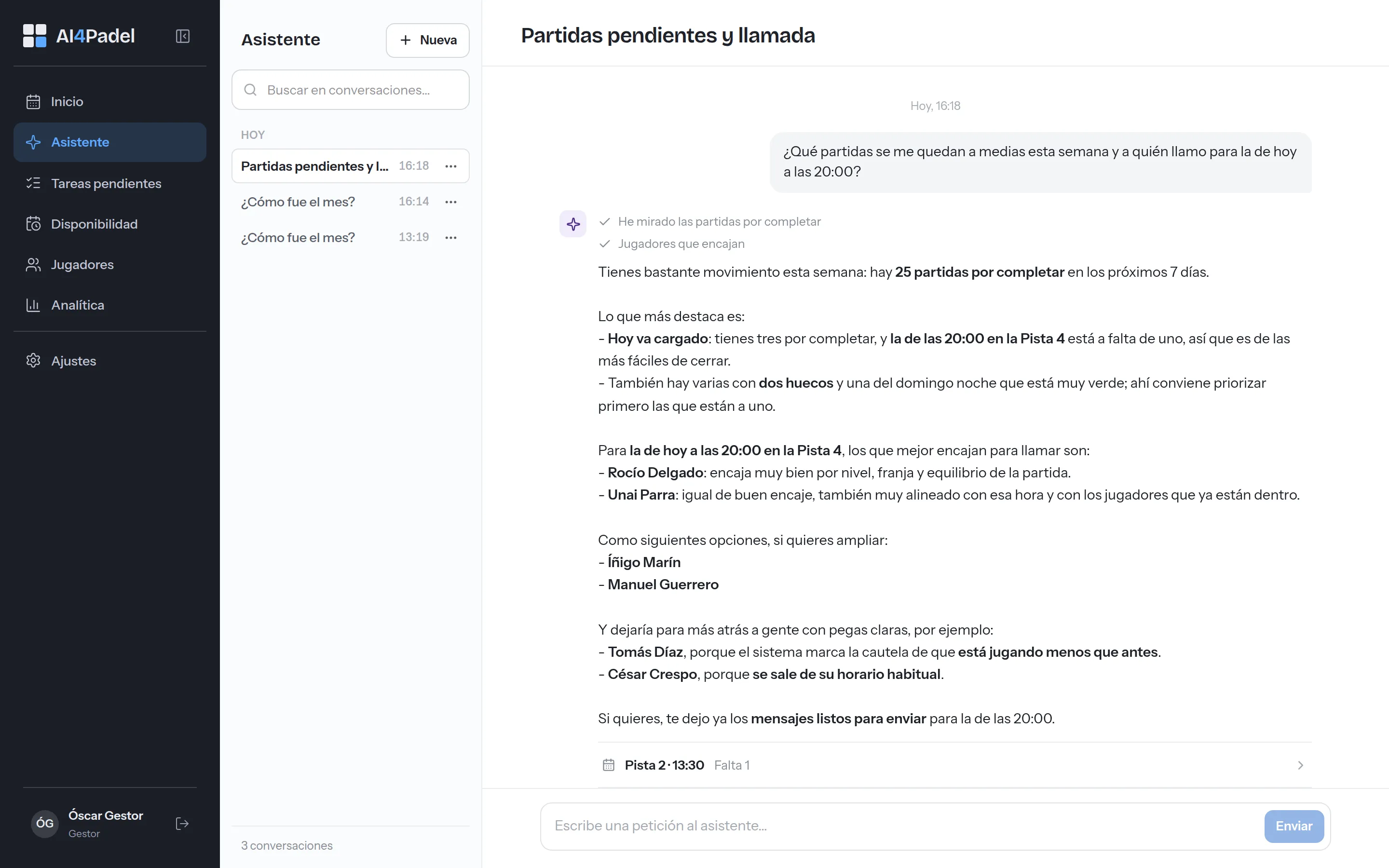
The assistant answers from the club’s data and leaves every match one click away. What gets sent is your call.
You can also ask it for work: to prepare a match or the messages. Whatever it prepares waits for your approval, and then goes out like everything else, by hand. The assistant talks to you; it never talks to your players, and what they write never reaches it.
Opt-outs are respected and promos need permission
Two flags AI4Padel respects at the root, not with an on-screen warning:
- The opt-out. If a player asks not to be written to, you note it and they disappear from every list and every proposal. It is not a warning someone can click past: they never show up again, not even to complete a match.
- Permission for promos. Without it, the player still gets messages about their own matches (telling them their 7pm court is one player short is a service), but they stay out of any campaign to bring them back, the ones in the Completo plan. If you bring your players in from a file, nobody gets promotions unless you mark the consent column.
If a player tells you at the front desk, it counts the same as in writing: you note it and it applies on the spot.
Messages are not metered
None of them. Not the invitations to complete a match, not the confirmations and reminders: we don’t charge you for a single message and there’s no cap on any plan. They leave from your WhatsApp, with one click that opens it with the message written, and sending them costs you nothing. The numbers are in what each WhatsApp costs.
None of this asks you for an afternoon of setup: the templates, the signature, the hours and the courts are set on day one, and changing them later takes an admin two clicks. How your players and your data come in, without migrating anything, has its own guide. Prefer to see it live? Book a 15-minute demo and we’ll go through it with your case in front of us.